Every sale. Every ad. Every channel. One screen that tells you what to do next.
Sellstead runs your online business like a full-time team would. Every morning it checks every account you sell and advertise through, finds the money you're wasting and the sales you're missing – and makes the changes for you – the moment you press Approve, or by itself with Auto Pilot, even while your computer is off.
No card needed · Sellstead Desktop for Windows and Mac · Cancel any time
Pause 6 keywords that never sellAmazon Ads · £96 spent, no orders
ApproveBlock 4 wasted searchesGoogle Ads · £41 this month
ApproveA rival cut its price 15%Now £8 under yours on 3 searches
See itStop switching between six dashboards.
Connect the places you sell and advertise once. Sellstead keeps them all up to date, side by side – with the same plain-English advice, and the same one-click fixes, for each.
Amazon
Your whole Seller Central and Amazon Ads – products, listings, shipments, orders, returns, reviews, ads, A+ and your Storefront.
Explore Amazon →Google Ads, Google Analytics, Merchant Center and your Google Business Profile – read every day and explained, with the fixes ready to approve.
Explore Google →Microsoft
Microsoft Advertising – the cheaper searches most sellers forget, managed alongside everything else.
Explore Microsoft →Your website & more
Your Shopify shop, Klaviyo email, eBay, Facebook and Instagram – next to your marketplaces.
Explore →Every channel in one program – arranged exactly how you work.
Sellstead isn't six tools bolted together. It's one package that combines every place you sell and advertise – and you decide what you see.
- Switch channels on or off – only pay attention to what you use
- Build your own dashboards, charts and graphs from any figure
- Move and resize any section of any page, and save your layout
- Several businesses in one Sellstead – each with its own channels, targets and schedules
- Choose what's on your Today screen and your morning list
- Themes, colours and your own logo on every report
- Team logins, read-only logins and shareable links
Build the dashboard you actually want to look at.
Every figure Sellstead tracks – from Amazon, Google, Microsoft and your website – can become a chart, a graph or a number on your own dashboard. Make as many as you like: one for the morning, one for ads, one for the boss. Try it below.
Add a widget
Layout
You're never on your own with Sellstead.
Every plan comes with a real onboarding – we set Sellstead up with you, connect your accounts and build your first dashboards. After that, regular calls keep you getting the most from it.
Guided onboarding
A set-up call where we connect your accounts with you, set your goals and build your dashboards – so it's useful from day one.
Every planRegular review calls
A specialist goes through your results with you, explains what Sellstead found and helps plan what's next.
Monthly on Pro · fortnightly on AgencyHelp on every page
Plain-English guides built into every screen, plus a full help centre with walk-throughs and videos.
Always thereChat & email support
Real people who know Amazon and ads, replying the same working day – and faster on Agency.
Mon–Fri, UK hoursSet up in ten minutes. Then let it work.
Download and connect
Install Sellstead Desktop on Windows or Mac, then link Amazon, Google, Microsoft and your website through their official sign-ins.
Set your goal
Tell Sellstead the ACoS or ROAS you want. Everything it suggests is measured against it.
Open your Action plan
What needs you today and what to do next, most important first – with the reason, in plain English.
Approve, or put it on Auto Pilot
Press Approve and it's done – or let Auto Pilot rules, Dayparting and schedules run by themselves, inside the limits you set.
Sellers who stopped guessing.
“[What a real customer says Sellstead changed for them – one or two sentences, in their own words.]”
“[What a real customer says Sellstead changed for them – one or two sentences, in their own words.]”
“[What a real customer says Sellstead changed for them – one or two sentences, in their own words.]”
Run your entire Amazon business without ever opening Seller Central.
Products, listings, shipments, orders, returns, reviews, ads and competitors – managed from one place, with Sellstead telling you what to do next and doing it for you when you say yes.
Selling
Orders, returns, buyer messages, reviews and feedback – everything that happens after someone clicks Buy.
Every order, the moment it happens.
A pop-up the second you sell. Returns with their reasons. Buyer messages you must answer within 24 hours. New reviews and seller feedback, with the bad ones first.
- Live orders with sale alerts on your desktop
- Returns and refunds, with the reasons that keep coming up
- Buyer messages, flagged before Amazon's 24-hour deadline
- Reviews and feedback – and Request a Review on every order
- Amazon support cases – read, reply and close them without leaving Sellstead
Listing management
Add products, edit every listing and fix problems before they cost you sales.
Add products and perfect every listing.
Create new products, edit titles, bullet points, descriptions, search terms and images, and see which listings have problems – all without Seller Central's maze of pages.
- Add new products and variations – one at a time, or a whole spreadsheet checked by Sellstead and sent to Amazon for you
- Reorder, replace and remove pictures without opening Seller Central
- Edit any listing and send it to Amazon in one click
- Listing problems and suppressed products, flagged
- Beat them: rewrites built from what your rivals do better – right inside the listing editor
Inventory & shipments
Stock levels, reorder dates and shipping plans to Amazon’s warehouses.
Never run out. Never over-order.
Sellstead works out how fast each product sells and warns you before it runs out – then helps you build the shipping plan to send stock in.
- Reorder warnings with the date you'll run out
- Create shipping plans to Amazon's warehouses
- Inbound stock tracked until it's live
- Aged stock and storage fees spotted early
Advertising
Sponsored Products, Brands and Display – audited every morning, fixed in one click, or run on Auto Pilot.
Ads that pay for themselves – on Auto Pilot.
Sponsored Products, Brands and Display, checked every morning against your goal. The Action plan tells you exactly what to pause, bid up, bid down or add – and Auto Pilot does it for you, even with your computer switched off.
- Action plan recommendations, with the reason for every change
- Create Sponsored Products, Brands and Display campaigns – or a whole set at once with Campaign Launcher
- Keyword harvesting, negatives and N-grams
- Dayparting, placements and budgets
- Auto Pilot, Dayparting and keyword harvesting run in Sellstead Cloud – every change recorded, with undo
Brand
Your A+ Content, Brand Store, videos and pictures – built and checked inside Sellstead.
A+ pages and a Brand Store, built in Sellstead.
Build Premium and Basic A+, Brand Story and your whole Storefront the way Amazon lays them out – with a preview on computer and phone, help writing every section, and Amazon's errors explained in plain English.
- A+ editor with comparison charts, carousels and videos
- Storefront builder – pages, menus, tiles and seasonal versions you can schedule
- Upload and play videos where your pictures are
- Every product's live pictures on one screen – and the small ones found and fixed
Research
What shoppers search for, how much, and where you stand.
Know what shoppers search before you spend a penny.
Search volumes, what's trending, which searches you show for and which you don't – and the bid to start at.
- Keyword Research with volumes, trends and suggested bids
- Search Query Performance – your share of every search
- Which competitors already target each keyword
- Add a keyword to a campaign in one click
Competitors
Who you’re up against for each product or range – and how to beat them.
Know every move your competitors make.
Their prices, deals, stock, reviews and listing changes – and when, where and how hard they advertise. Matched to each of your products or ranges, so you only see who you're really up against.
- Ad watch: who advertises on your searches, hour by hour
- Potential rivals spotted before they hurt you
- Estimated sales, ad spend, ACoS and ROAS
- Show your ads on their product pages in one click
Money
What you really made after fees, ads, costs and VAT.
See what you really made.
Sales are not profit. Sellstead takes off fees, ad spend, product costs and VAT to show what each product actually earns – and sends you the week's summary.
- Profit per product and per day
- Fees, payments and reimbursements Amazon owes you
- VAT and break-even ACoS worked out for you
- Weekly summary by email
- Every Seller Central report – inventory, orders, FBA, settlements, VAT – in one place, ready for Excel
Everything Google, finally in plain English.
Google Ads, Google Analytics and your Google Business Profile – checked every day, explained in plain English, with the fixes ready to approve.
Google Ads
Search, Shopping and Performance Max – where your money goes and what to change.
Every campaign, keyword and search term.
The whole account laid out the way you think about it – not the way Google's menus do.
- Campaigns, ad groups, keywords and search terms
- Ads, sitelinks and Performance Max asset groups
- Spend, revenue, ROAS and conversions at a glance
- Change history for every edit
Block the searches that never sell.
Sellstead finds the search terms and placements eating your budget without a sale, and blocks them in one click.
- Wasted search terms, ready to add as negatives
- Placements and apps that never convert
- Devices, locations, age and gender that underperform
Auction insights, explained.
See which competitors show up against you, how often they outrank you, and where you're winning.
- Impression share against each competitor
- Where they outrank you, and how often
- Side by side with your Amazon competitors
Google Analytics
Who visits your website, where they come from and what they buy – without learning Analytics.
Your website's numbers, side by side with your ads.
See which Google Ads clicks actually turn into sales on your site – and which channels bring your best customers.
- Live visitors right now
- Traffic sources and best pages
- Sales, products and enquiries
- Next to Amazon and Google Ads figures
Google Business Profile
How local customers find you on Google Search and Maps – and what they say about you.
Every review answered. Every search counted.
New reviews arrive in Sellstead the day they're posted, with the bad ones first, and you can see how many people found you, called you or asked for directions.
- New reviews, with a reminder to reply
- Searches, views, calls and directions
- Posts and updates in one place
Google Merchant Center
Your product feed for Shopping ads and free listings – checked so nothing gets left out.
Every product in your feed, checked.
See which products Google has approved, which it has turned down and why – up to 15,000 products, with each problem explained.
- Approved, limited and disapproved products
- The reason for every problem, and how to fix it
- Users and linked accounts in one place
The cheaper clicks your competitors forget.
Microsoft Advertising reaches buyers your rivals ignore, often for less per click. Sellstead watches and manages it right next to Google and Amazon.
Microsoft Advertising
Search ads on Bing, Edge and partner sites.
All your search ads, compared.
See Microsoft Advertising next to Google Ads and Amazon Ads – and move budget to wherever it earns the most.
- Campaigns, keywords and search terms
- Spend, sales and return on ad spend
- The same waste checks and recommendations
- One morning list for every channel
Win the searches nobody else is fighting for.
Start free trial →Your own shop and the rest, next to your marketplaces.
Shopify sales, Klaviyo email, eBay, Facebook and Instagram – side by side with Amazon and Google, so you see your whole business in one number.
Your website sales, next to Amazon.
Every order from your own shop in the same daily figures as your marketplaces – one total for the whole business.
- Website sales next to Amazon sales, every day
- Best-selling products across every channel
- One total for the whole business
- Website visitors from Google Analytics alongside
Email, eBay, Facebook and Instagram.
The other places your customers find you – all in the same screen.
- Klaviyo email flows and what they earn
- eBay sales
- Facebook and Instagram ads and what they bring in
- All in your one morning list
One number for your whole business.
Start free trial →Pays for itself with the first wasted keyword it stops.
7 days free. Prices exclude VAT. Change or cancel any time – or pay yearly and get 2 months free.
Amazon Core
The Amazon essentials.
- Selling, orders, customers and account health
- Ads, bids and the Action plan
- Create campaigns one at a time
- Profit, payments and reimbursements
- Onboarding call + chat & email support
Amazon Growth
Grow it on Auto Pilot.
- Everything in Core
- Auto Pilot rules, Dayparting and keyword harvesting
- Runs in Sellstead Cloud with your computer off
- Campaign Launcher and shipping plans
- A+ editor, keyword research and marketing
- Your website and Amazon reports
Amazon Pro
Every Amazon tool.
- Everything in Growth
- Storefront builder and videos
- Competitors, Ad watch and audiences
- Sellstead’s ready-made reports
- Monthly review call with a specialist
Agency
For agencies and several brands.
- Everything in Pro
- 3 businesses, then £99 each
- Branded reports for your clients
- Fortnightly calls and a named account manager
- Priority support
Don't sell on Amazon?
Build your own plan from just the channels you use – Google, Microsoft, your website, Facebook & Instagram, eBay. £149 for the first channel, and each one after costs less.
Add more channels
Add any of these to any plan, a month at a time.
What Sellstead replaces
Typical published prices, Nov 2026 – converted from US dollars and roundedSeparate tools usually come to £400+ a month before any percentage of ad spend – with no one to call. A managed service with regular calls starts around £1,750 a month. Sellstead Amazon Pro is £549: every Amazon tool, Auto Pilot running day and night, your own dashboards, and a specialist on the phone every month.
How does the 1% work?
On Amazon Pro and Agency, the first £10k of ad spend a month is covered by the plan. Above that it's 1% of the extra spend Sellstead manages – a third of the 3% many ad tools charge.
What happens on the review calls?
A Sellstead specialist goes through your results with you – what changed, what Sellstead found, what to do next – and helps set up anything new. Monthly on Amazon Pro, fortnightly on Agency.
Is there a contract?
No. Plans are monthly and you can cancel any time.
See Sellstead at work. Eight screens, two minutes.
Real Sellstead screens with a made-up padel shop. Step through them below – then download Sellstead Desktop and try it on your own accounts, free for 7 days.
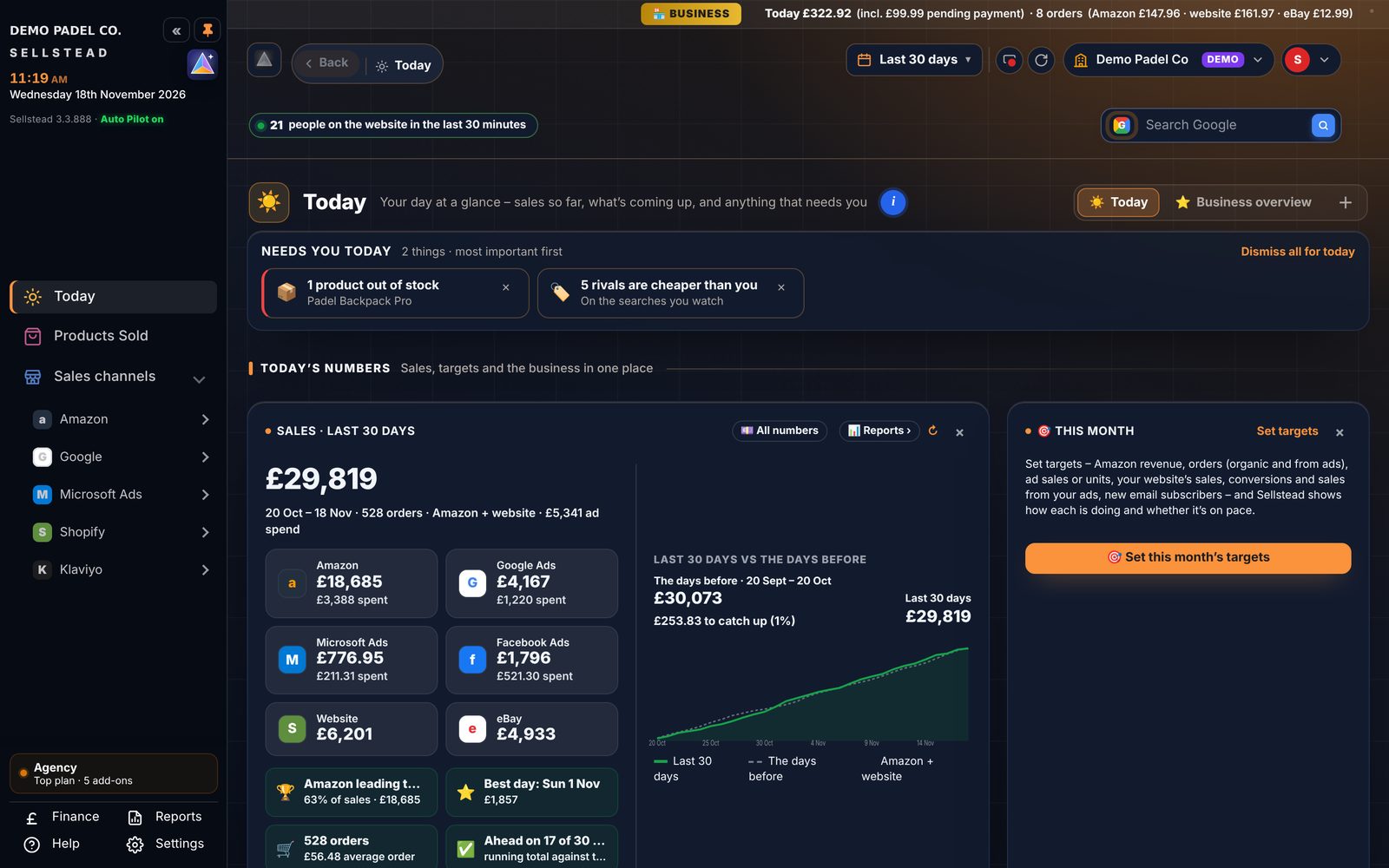
Sample data. Use the arrow keys or swipe to move between screens.
Download Sellstead Desktop and start in minutes.
No card, no forms. Install it, open it, and your 7-day free trial starts straight away. Need longer? Ask from inside Sellstead and we can extend it.
The download buttons go live when Sellstead Desktop is released.
Download and install
Pick Windows or Mac above and open the file. It installs like any other program.
Start your trial
Open Sellstead Desktop and enter your name and email. Your 7 days start there and then.
Connect your accounts
Link Amazon, Google, Microsoft and your website through their own official sign-in pages.
See what it finds
Your Action plan fills up within minutes. Choose a plan any time before the 7 days are up.
On a Mac, the first time you open it: right-click Sellstead Desktop in Applications and choose Open.
Questions sellers ask.
Does Sellstead make changes by itself?
Only the ones you set it up to make. Recommendations are made when you press Approve; Auto Pilot rules, Dayparting and schedules you switch on run by themselves, inside the limits you set – a daily spend check, a highest bid and your ACOS or ROAS goal. Every change is recorded in Change history, with undo where the platform allows it.
Does my computer need to be on?
No. Auto Pilot, Dayparting, keyword harvesting and sale and budget alerts run in Sellstead Cloud, so they keep working with your computer switched off. Alerts can go straight to your phone.
What happens after the 7 days?
Sellstead Desktop asks you to choose a plan. If you need longer to decide, press Ask to continue inside Sellstead and we can extend your trial.
Do I have to give Sellstead my passwords?
No. You connect Amazon, Google and Microsoft on their own official sign-in pages and choose what Sellstead may do. Sellstead never sees your passwords.
Which marketplaces does it support?
[MARKETPLACES – e.g. Amazon UK today, more to follow]
Can I use just Amazon, or just Google?
Yes. Connect only the platforms you use – you can add the others whenever you like.
How does the 1% on Pro and Agency work?
The plan covers the first £10k of ad spend a month; above that it's 1% of the extra spend Sellstead manages.
Do I need Amazon?
No. The Custom plan is Sellstead without Amazon – just the channels you choose, like Google, Microsoft, your website, Facebook & Instagram and eBay.
Does it work on a Mac?
Yes. Sellstead Desktop runs on Windows and Mac.
What help do I get?
Every plan starts with a set-up call where we connect your accounts and build your dashboards with you. Amazon Pro adds a monthly review call, and Agency a fortnightly call with a named account manager. Chat and email support is on every plan, Monday to Friday.
Can I make my own charts and dashboards?
Yes. Any figure Sellstead tracks can become a chart, graph or number on your own dashboards. Drag them where you want, resize them, switch chart types, and keep as many dashboards as you like.
Can I cancel any time?
Yes. Plans are monthly, with no contract.
The best decision your ad budget will make this year.
Download Sellstead Desktop and see what it finds – free for 7 days.
Start your free trial →